Your app is the canvas.
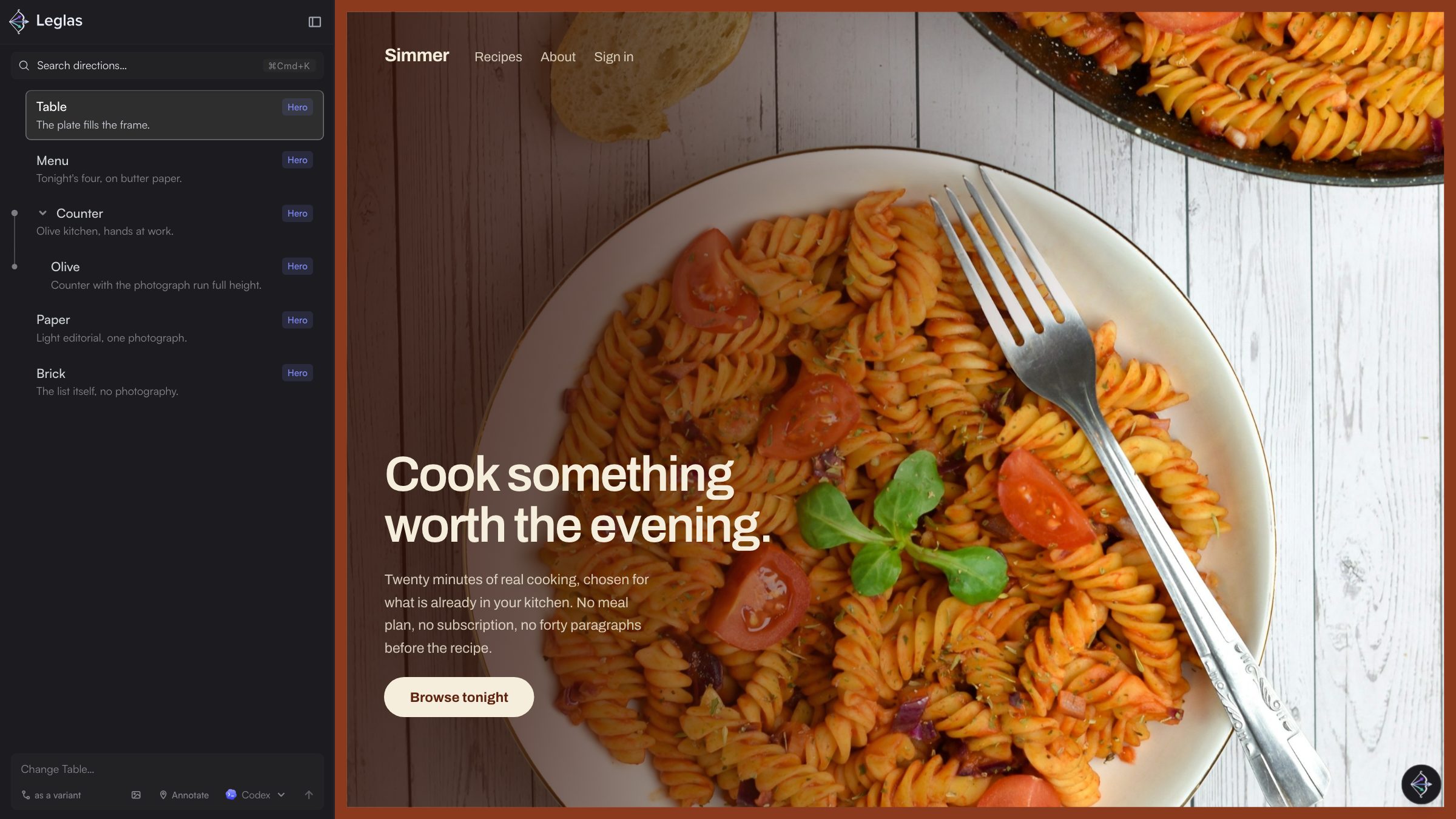
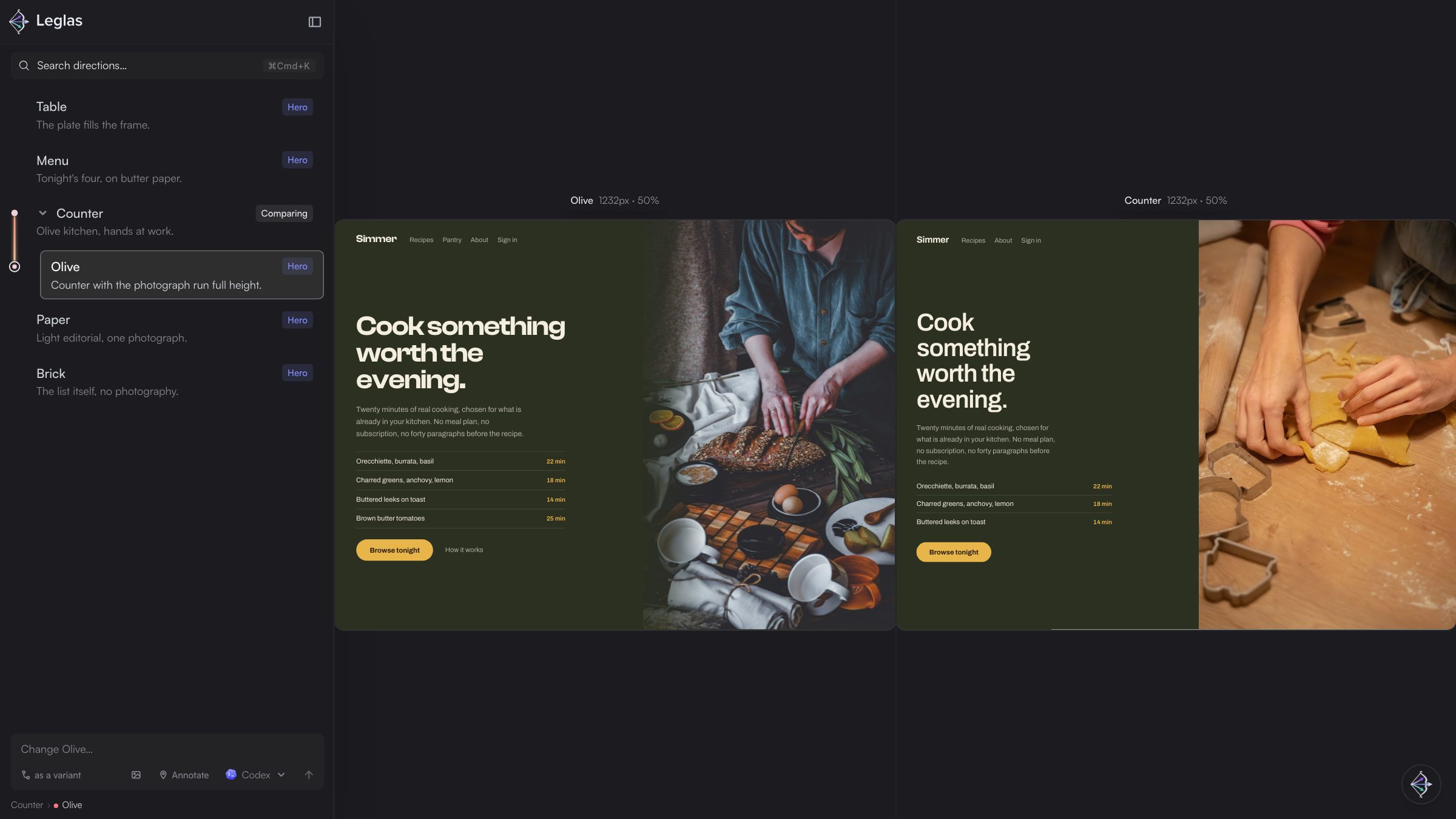
Compare design directions inside your own running app. Ask your agent for a handful of directions for the landing page, the checkout, the empty states, and Leglas runs them all as your actual app, side by side in one place, holding your notes on each. Every variation is the real product, motion and data included, so choosing between two directions is choosing between two things that already exist.
Why
Design in the medium you ship.
Code is becoming the source of truth. Features go from prompt to working code in minutes, and mockups lag behind the product and drift out of sync. The fastest teams already design in the medium they ship, and Leglas is built for working that way: many directions at once, live, in your own app.
Your app does not change to make any of this work. Leglas proxies the dev server you are already running: one config file to delete when you are done, and sessions that clean up after themselves.
What you can do
Explore far and wide without losing your opinion of anything.
- Compare side by side. Pick any two directions when it gets hard to choose.
- Keep your read on every idea. Name each direction, drag to reorder, set aside the ones that do not feel right. Your notes survive a long exploration.
- Send a link, not a screenshot. A teammate opens the live direction instead of a picture and a paragraph of explanation.
- Compare what no design tool can hold. Three git branches, a local build against production, yesterday's direction against today's.
- Your agent does the building.
leglas initteaches any coding agent the workflow andleglas explorebriefs an exploration. You choose the spread, your agent supplies the taste. - Ask for changes where you are. Describe what you want on the direction you are looking at. Leglas turns it into a precise request, file path included, and hands it to the agent you picked, Claude Code, Codex or Cursor, without you leaving the comparison. Your agent, your subscription, no keys.
- The agent sees what you see. Every request carries a screenshot of the direction, a crop of whatever you pointed at, and any reference image you pasted in.
- Keep the winner with one command. It moves into your source tree, the exploration is cleared away, and what was decided is written down in
design-log/.
How it works
One proxy, and your app untouched.
Leglas runs one local server that serves the interface at /leglas and forwards every other request to your dev server. Previews load through that proxy, so they are same origin with the interface: no CORS configuration, no cookie special cases, and hot module replacement survives the hop.
It works with whatever you are building in. Leglas never imports or executes your framework, so the target can be Next, Vite, Remix, SvelteKit, Astro or a folder of static files.
Install
There is nothing you have to install.
npx leglas- Fetches the CLI on first use and starts from npm's cache after that. Every instruction Leglas writes for agents uses the same form, so a fresh clone works with no setup.
npm install -D leglas- Pins the version in a project, so teammates and CI get the same Leglas from their normal install.
npx skills add FredAmartey/leglas- Teaches an agent the workflow in any project. The repository is also an Agent Plugin, so a client that implements the standard picks up the skill and the MCP server together.