How Leglas is built
Under the hood, Leglas is one Node process between your browser and your dev server, and an agent working through it. Here's how the pieces fit together and what happens to a change request after you press send. If you want more of the details behind Leglas you can find that here, if you're interested in contributing take a look at the CONTRIBUTING.md file and if you're just looking for the easiest way to use Leglas, .
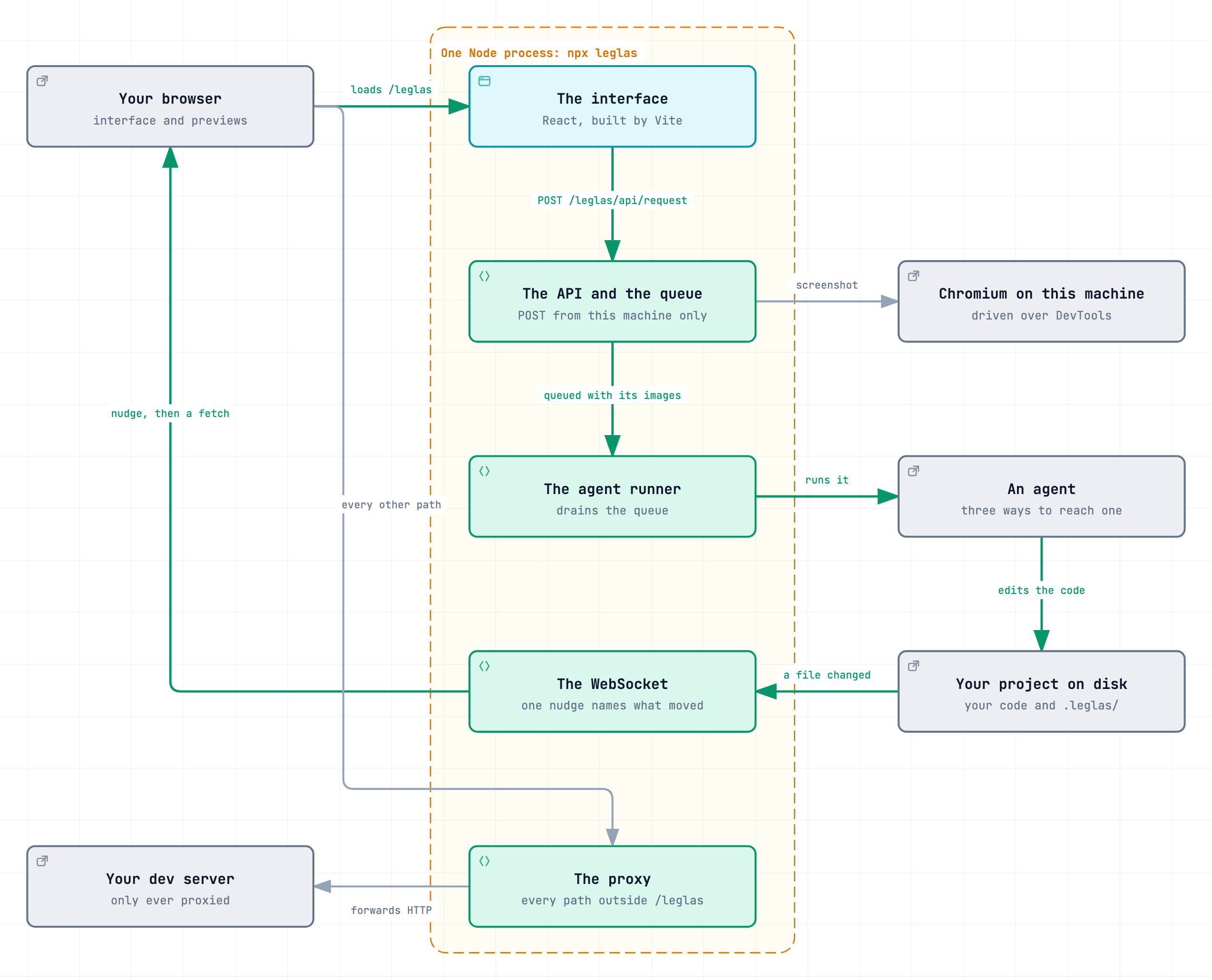
What is happening under the hood. One Node process sits between your browser and your dev server. The agent, and the Chromium that takes the screenshots, run on the same machine but outside it.
ELI5: One program between your browser and the app you are building
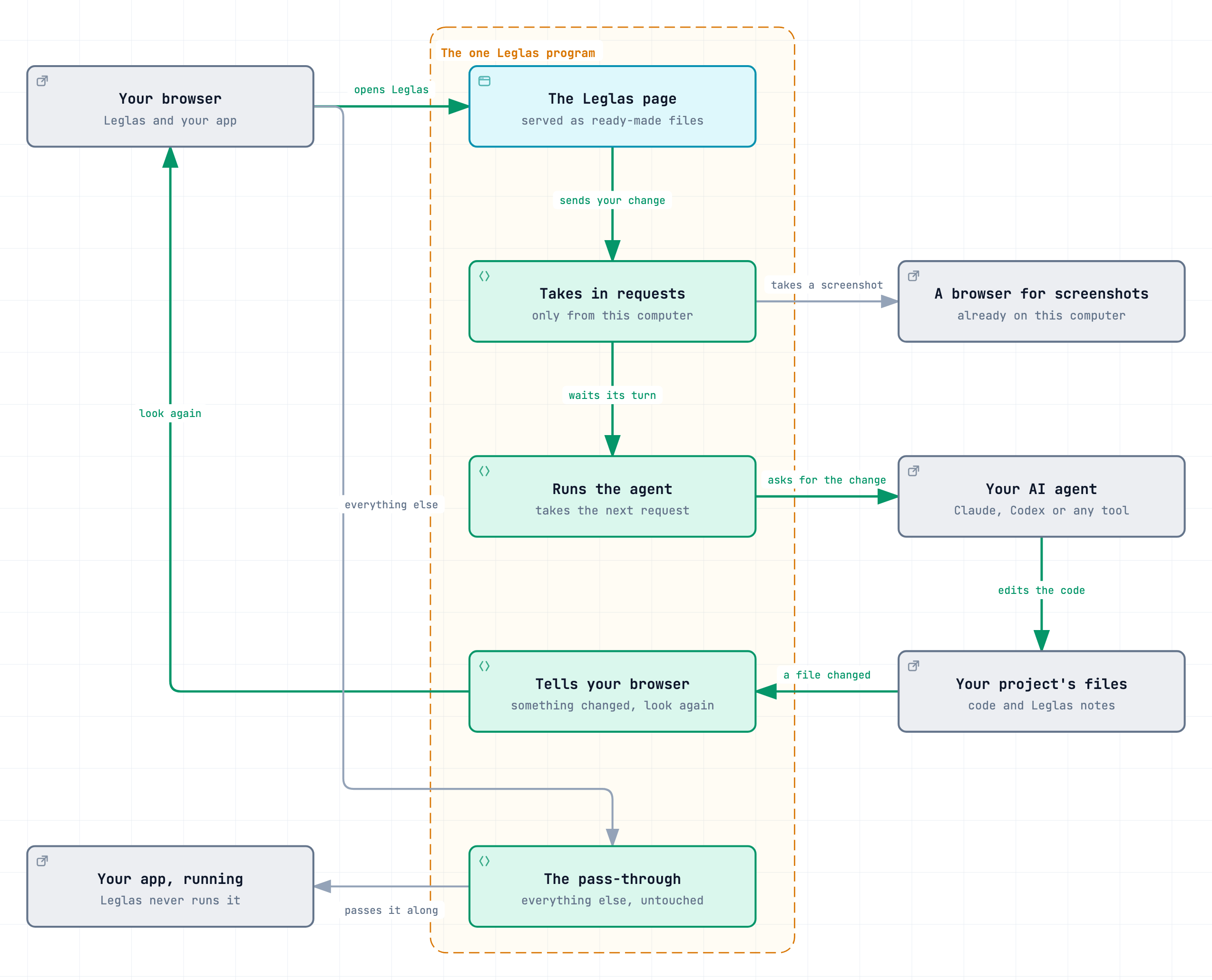
Leglas is one program that sits between your browser and the app you are building. You type a change, Leglas takes a screenshot, an agent edits the code and your browser is told to look again. It never runs your app itself, which is why it works with any framework.
One process in front of your dev server
npx leglas starts one Node process. It listens on a local port, 4100 unless that is taken, and answers four kinds of request:
browser ── http://localhost:4100
             /leglas            the interface, served as built static files
             /leglas/api/...    the JSON API behind the interface and the commands
             /leglas/files/...  plain HTML files a config mounts
             everything else    your dev server, through a proxy
The app arrives through the proxy, so each preview is an iframe on the same origin as the interface. That is why a relative preview URL needs no CORS setup and why Leglas works with any framework: it never imports or runs the app, it only forwards HTTP to it.
The server pushes to the interface over one WebSocket, which it implements itself. A push is a nudge that names what moved (the config, the requests, the dev server's health, a share, an update, a set being built), and the interface fetches that again. Nothing else holds a connection open.
A POST to the API is accepted only from this machine, and when the browser sends an Origin it has to match the address the server was reached by. That keeps a page in another tab from queueing work for an agent.
The packages
| Package | On npm | What it is |
|---|---|---|
packages/server | no | The HTTP server: config loading, the proxy, the API, the request queue, the agent runner, screenshots, branch previews, sharing, the update check and building a set of directions with Claude or Codex |
packages/shell | no | The interface: a React application built by Vite into static files |
packages/cli | leglas | The binary. Parses the command line, starts the server and holds every command an agent runs |
packages/mcp | leglas-mcp | A stdio MCP server that exposes those same commands as tools |
They depend on each other in one direction:
leglas-mcp ──► leglas ──┬──► @leglas/server
                        └──► @leglas/shell, as built files
Only two packages reach npm. When packages/cli builds, the bundler inlines @leglas/server and copies the built interface into dist/shell, so leglas installs as one package with no runtime dependencies. The Claude Agent SDK is the one exception: it stays an optional dependency because it finds its platform binary at run time.
What leglas and leglas-mcp export is recorded in api-surface.txt at the root. pnpm api:update rewrites it from the built type declarations, and a patch release is refused when it has moved.
Inside the server
packages/server/src keeps what answers requests at the top and groups the rest by area:
| Folder | What is in it |
|---|---|
agents/ | Finding the agents on the machine, the three ways to reach one, the runner that drains the queue and the reasons a run can end |
requests/ | The queue, the notes left on a preview and the images that ride with a request |
capture/ | Finding and driving a browser over the DevTools protocol, the screenshot and its crops, hydration evidence, and text on the page that overlaps or is cut off |
config/ | Finding and loading leglas.config.ts, and what is local to one machine: added directions and renames |
branches/ | Deciding whether a direction needs its own branch, and the worktree, install and dev server when it does |
share/ | The share itself and the tunnel it borrows |
generation/ | Building a set of directions with Claude or Codex: each agent's restricted runs, the plan, the builds, the render check that calls one ready, the slots in the switch file and the record of each set |
At the top, server.ts is the HTTP server and every API route, proxy.ts forwards to the dev server, live.ts is the WebSocket, server-info.ts writes server.json, update.ts is the update check, log.ts composes the design log entries leglas keep writes, and index.ts is what the package exports.
Inside the interface
packages/shell/src follows the same rule: the frame of the application at the top, one folder per feature under it. A feature's component, its logic, its calls to the API and its hook sit together, and the logic is the part with tests.
| Folder | What is in it |
|---|---|
share/ | The share panel, what a share is on this side and the calls that start and change one |
update/ | The update chip and its panel |
generation/ | Building a set of directions: the brief's controls, the card that follows a set, the cover over a direction not ready yet, and the calls and poll behind them |
annotate/ | Notes pinned to a spot on a preview: the layer, the anchor that finds the spot again and the notes API |
references/ | Images attached to a request: the strip, what is admitted and the upload |
rail/ | The rail: its header, a row and the pieces of one, the search field, tag colours and the dialog that confirms a delete |
composer/ | The controls around the field a change is typed into: the mode chip, the attach and annotate buttons, the send |
stage/ | What sits beside the rail: one preview pane, and the tools the floating widget opens |
lineage/ | Which direction came from which: the tree, the lines in the gutter, the crumbs and the trail |
agents/ | Picking an agent and its effort, what state a request is in and why one failed, the status card above the composer, connecting an MCP host |
preview/ | What the stage has to know about a frame: its identity and when it is ready, the duplicate scan, the dev server's health, the second pane of a comparison, framework overlays |
ui/ | The shared components, tips, toasts, the orb, the clipboard and the floating widget's drag rules |
net/ | The fetch wrapper, the WebSocket client and the poll that cannot outrun itself |
At the top, App.tsx reads the config and decides between the interface, a notice and a share that has ended. Shell.tsx is the rail and the stage, and HelpOverlay.tsx is the list of keys it opens. Shell.tsx holds the state the rail and the stage share and hands each piece what it needs, so a piece can be read without it. useShellState.ts is the behaviour under them: selection, search, rename and remove, the keyboard, resizing and which panes are mounted. reference.ts is the text a copied direction carries, which has nothing to do with the images in references/. types.ts, prefs.ts, keymap.ts and naming.ts are shared by all of it.
Where state lives
Leglas has no database and no account. The committed leglas.config.ts is the only description of a project that teammates share. Everything else is local to one machine, in a .leglas/ directory inside the project. The main entries:
| Path | What it holds |
|---|---|
previews.json | Directions added from the interface or by leglas add |
renames.json | What a direction is called on this machine when that differs from the config |
requests.json | The queue of change requests |
annotations.json | Notes left on a preview that have not been sent yet |
captures/ and references/ | Screenshots taken for a request, and images a person attached to one |
variants/ | Switchers scaffolded by leglas new |
generations/ | A record of each set of directions Leglas built, with pictures; the newest 100 |
worktrees/ | Checkouts for directions that live on their own branch |
watch.json | The agent command chosen for this project |
server.json | Where the running server is, so a command in another process can find it |
The server watches the config and these files and nudges the interface when one changes, which is how leglas add in a terminal shows up in an open rail.
The path of a change request
- Someone types into the composer, or drops notes on a preview. The interface posts to
/leglas/api/request. - The server takes a fresh screenshot of the direction. It drives a Chromium already on the machine over the DevTools protocol, and crops around every note from that one page load. It also reads the console for a hydration error, so the prompt can say the app rebuilt the page.
- The request goes into the queue with its images, its notes and whether it forks a new direction or edits this one.
- The runner takes it when an agent has been picked in the interface. There are three ways to reach an agent: a Claude Agent SDK session, the Codex app server, and a command template for any other CLI. All three look the same to the rest of the runner.
leglas watchis this loop in a terminal, and an MCP host that is working the queue gets the same right of way. - The agent edits the project. When a run ends badly the runner names why from a fixed set of reasons, never from captured output, because a provider log can carry a prompt.
- The queue file changes, the server nudges, and the rail shows the new direction.
Directions on their own branch
Most directions live in the running app and switch instantly. leglas classify sends one to its own branch only when it cannot sit in the same server, for example when it changes dependencies. Such a direction gets a git worktree under .leglas/worktrees/, its own install, its own dev server and a proxy of its own in front of that. None of it starts until someone opens the direction, and one left idle is stopped again.
Sharing
A share starts a second listener on the loopback interface and points a tunnel at it. Requests that arrive there are marked remote: they get the interface in a read-only form, a config trimmed to what the share lists and a health verdict, and every other API route answers 403. How far a viewer can reach into the dev server is decided by path on the server, so it holds against anything a page's own JavaScript could try.
The MCP server
leglas-mcp calls the functions the CLI calls and returns the same envelope, so a behaviour fixed in packages/cli is fixed for both. What it adds is finding the project: a plugin host starts it in the plugin's own directory, so it asks the host for its workspace roots before it trusts the working directory, and refuses when nothing names a project. On a host that speaks channels it also pushes each request into the open session.
Around the packages
| Path | What it is |
|---|---|
site/ | Builds the homepage, the changelog page and these pages. It runs on Vercel with no install step, so it imports nothing from npm |
test/ | Tests about the repository: the plugin manifests, the publish workflow, what the CLI tells people to type |
evals/ | A benchmark cut from this repository's own fixes. Inside a task only instruction.md and task.toml are written by hand. evals/build.ts rewrites the rest, most of it copied from other commits |
skills/leglas/ | The skill an agent loads. With plugin.json and mcp.json at the root it makes the repository an Agent Plugin |