Using Leglas
Start your dev server, run npx leglas from the project directory and open http://localhost:4100/leglas. This page is about what you find there. Getting more than one thing to compare is in Setting up a project.
The rail and the stage
Directions live in a rail on the left. The stage shows the active one in a framed viewport at Full, 1440, 834 or 390 wide. Rename, reorder, hide and tag directions from the rail; open the removed list to restore one, delete it for good or clear the list. Your layout is saved per project and survives restarts.
A small tools widget floats over the stage and can be dragged to any corner. Its popover holds the viewport presets and a few preferences, such as hiding your framework's dev badge when it covers the part you are judging.
Comparing
Flipping shows a difference over time. A split shows it at once, which is what you want for the last two in contention: press C, or hover a direction and press its compare button, and it becomes the right pane while the active direction holds the left.
Each side is drawn at the width it had on its own and scaled to fit, so nothing reflows and flipping and splitting agree about what the design is. An app given half the room would cross its own breakpoints and draw a different design. If the narrow rendering is what you want, the tools popover's "Scale each side to fit" switch is for that.
Asking for a change
Type what you want into the field under the rail, or press R, and Leglas composes a request naming the direction and the file behind it, copies it to your clipboard and queues it. The direction it means is the one highlighted directly above the field. By default the request asks for a new variant beside that direction; the chip next to the send button switches it to a change in place, for when a change really is a fix.
Pick an agent once from the picker beside the send button and the card above the field shows it working: the file it is editing, how long it has run, how long it has been quiet if it goes quiet, a stop if you change your mind and a retry when a run goes wrong.
Every request carries a screenshot of the direction at the width you are looking at, a crop of anything you pointed at, the other pane when you are comparing and any image you pasted in as a reference. Leglas runs no model of its own; your agent already knows your conventions and your taste.
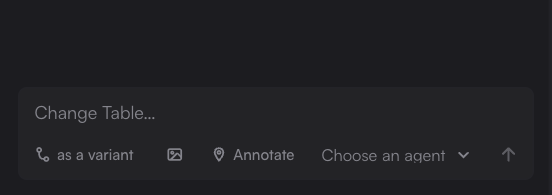
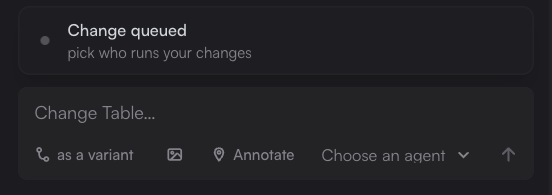
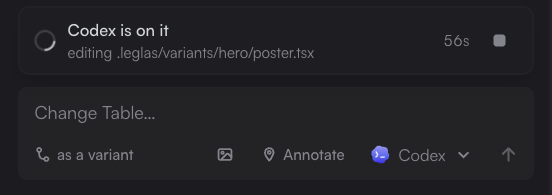
Nothing waiting, then a request queued, then an agent that has taken it.
Hover any direction to see what it was built from and the change that was asked for, in the words that were typed.
What happens to a request once it leaves the field, and how to run one from a terminal instead, is in Working with agents.
Pointing at the problem
Most of what you would type is the part describing where the problem is, so point at it instead. Press A and the preview becomes a picker: hovering outlines the element under the pointer, clicking drops a numbered pin that takes a note, and dragging marks an area and names every element inside it. Click a pin again to reread it, reword it or drop it. The page still scrolls, so the thing three screens down is as easy to mark as the headline.
Annotations are a request on their own, so the field can stay empty: leave three and send once. Each carries the element's own words, its tag and classes, a path and the box it filled, and tells your agent which of those to trust first, because the design moves under them by design. A pin whose element has since gone turns amber rather than pointing confidently at the wrong thing.
Building a set of directions
Leglas can build directions itself, with Claude or Codex, once you turn on Build directions with Claude or Codex in the tools. The + at the top of the rail then turns the field into a brief: say what the directions should explore, pick how many, up to six, and press Build 3 with Claude, named for whichever of the two is your agent.
The agent plans the whole set first, so the directions differ from each other and from the ones already there, and all of them appear on the rail at once. They build side by side. Each row says whether its direction is building, being checked, failed or stopped, and the stage shows what a direction still being built is meant to be. Leglas opens every one before calling it ready and gives one that does not render, or whose text runs into other text or off the page, one attempt to fix itself. A build that edits any other file is stopped, and Leglas puts back the switch, existing directions and the files they import. Stop it, retry it or ask for a new idea from its row or the stage. Once two are ready, Compare all on the card puts the ready ones on the stage side by side, each drawn at its own width; a name opens that direction.
Builds show real things with your project's own images and carry the rest with type, colour and layout, not pictures drawn from shapes. Leglas tells them what each image shows from the alt text your code already gives it; an image with none is passed by name only.
To take one further, open the brief while it is on the stage and press More like Menu in its header. The agent builds variations that keep the direction and each change one thing, and they sit under it on the rail. The brief is optional there: say what to vary, or leave it to the agent.
It runs on your own plan at medium effort, with your MCP servers, skills and plugins left out. On the demo app Claude built three directions in about a minute and a half and three variations in under a minute; Codex took a little over two minutes for three directions. Codex also reads the global AGENTS.md in its home, which nothing lets Leglas leave out. npx leglas explore hero --build --brief "…" does the same from a terminal.
Leglas keeps a record of each set in .leglas/generations/, one folder per set: the brief, the plan, every build and fix run with its prompt, what each check found, a picture of each direction as last checked, and what was done with them after (a stop, a retry, a new idea, More like, a keep or a remove). The prompts carry what Leglas read from your project, and the folder stays on your machine. A set of three takes about 0.3 MB and the newest 100 sets are kept. Set recordSets: false in the config to keep none.
Sharing
The rail is local, and the person who most needs to see it often has no repo. The share control in the rail's header fixes that. It has its own page.
Keys
Arrows move between directions and 1 to 9 jump straight to one. R asks for a change, A annotates, C compares, Cmd K (Ctrl K elsewhere) searches, T opens the tools popover and B collapses the rail. Press ? for the whole keymap.
Updating
Leglas asks npm once a day whether a newer version exists and says so in the terminal and beside its name in the interface, where one click installs it and starts Leglas again. The check reads the registry your npm is configured for. Set LEGLAS_NO_UPDATE_CHECK=1 to turn it off; the version stays in the interface and you can still check by hand from there.